Auth prototype portal showing a user's entitled apps and the full workspace directory

Auth: one login for every app you're entitled to

Most people at a growing company sign in more times before lunch than they can count, and still can't tell you which internal apps they're allowed to open. Now add agents to the picture. Each one acts on a person's behalf and needs its own bounded, auditable access. Auth is a design prototype of what the access surface could look like when it's built for both kinds of actor from the start: a portal that shows you exactly what you can open, computed fresh from your teams every time the page loads, and a way to give an agent a defined set of actions on specific projects. Here's the thinking behind the screens.

Updated
July 12, 2026
Reading Time
8 min
Auth — an interactive prototype. Click to open it live.

The second prompt nobody should have to answer

You've already signed in this morning. Your laptop knows who you are; your company knows who you are. Then you click into the finance app and it asks again — a different password, or one you reset last month and can't remember, or a login screen you've never seen because someone provisioned the account for you back in the spring and you're only opening it now. So you file a ticket. Someone checks a spreadsheet. Twenty minutes evaporate before any real work happens. Multiply that by every internal tool and every person, and you have a permanent, invisible tax on a scaling company.

Underneath it sit two familiar failure modes. The first is password sprawl: a separate credential for each app, each one a support ticket and a soft security hole waiting to happen. The second is quieter and worse: access drift. Access gets granted once, written down somewhere, and then reality moves. People change teams, projects end, a contractor's engagement lapses. The written-down grant stays where it was, so the list of who-can-open-what slowly stops matching the list of who-should. Nobody decides that. It accumulates on its own, and it's the exact material a breach is made of.

Both problems predate AI. What made us pick identity for a design sprint is the new actor that's arrived on top of them.

Agents need access too

Agents now act on people's behalf: they file the report, query the warehouse, open the ticket. An agent doing real work needs identity and bounded access just as much as the person it works for — arguably more, because it acts faster and at larger scale. An over-privileged agent is a worse liability than an over-privileged employee. It can exercise the whole of a stale grant in seconds, and it never feels the social friction that makes a person pause and ask whether they should really be able to open something.

That changes what an access surface is for. Checking who can open what stops being a once-a-quarter review chore and becomes a live boundary that every actor, human or agent, is checked against continuously. Once you take that seriously, the design follows. Most of what you see in the prototype's screens is the consequence of asking one question: what would this surface look like if the access answer were always current?

A portal that shows you what you can open

The end user's home screen is a Portal headlined "Everything you can open, in one place." It shows a small set of app cards (in the demo these are placeholders like a data-warehouse console, a finance app, and a build tool), each with its real domain in quiet monospace and a single open action that leads straight in. No second password, no second prompt. Each card also carries a verified mark, and that mark is first-class in the design: in a world where anyone can stand up a plausible internal-looking tool and phish a login, and where an agent following instructions won't hesitate the way a person might, the portal's job is to vouch that an app is a real, sanctioned part of the workspace.

Below your own apps sits the full workspace directory: every app in the workspace, including the ones you can't open. An early instinct was to hide those. The design keeps them, marked honestly: verified · yours for the apps you can open, verified · no access for the ones you can't (in the demo, an incident-response tool sits in that state). Showing the map without handing over the keys turns the vague anxiety of "there's probably a tool for this somewhere" into a concrete, answerable request: you know the tool's name, and you can ask to join the team that reaches it. Visibility and access are two different permissions, and the design treats them differently.

Entitlement is computed, never stored

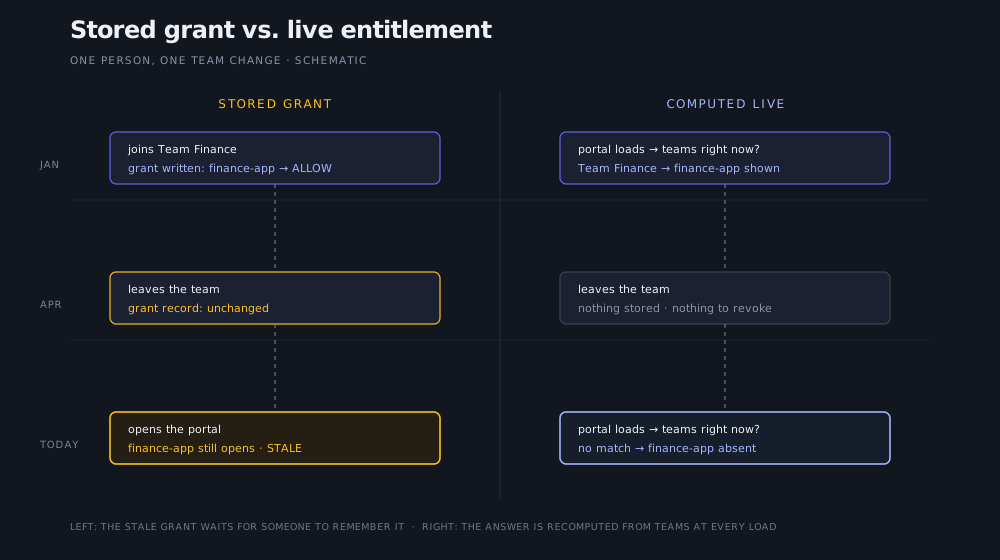
Under the portal's header sits the sentence that carries the whole design: entitlement is computed live from your teams every time this page loads. Most access systems store a grant: a snapshot of permission written down at some past moment. That snapshot is the thing that drifts. The prototype doesn't store the answer. Each time the Portal loads, it asks which teams this actor is on right now and which apps those teams reach, and renders the result. If someone rolled off a team an hour ago, the app tied to that team simply isn't on the page. Nobody ran a de-provisioning task. There was no stored grant to forget about, so the drift never gets a place to live.

Two timelines comparing a stored grant, which survives a team change and stays open as a stale permission, with live entitlement, where the app simply disappears at the next page load after the team change.

One person, one team change. A permission you recompute can't drift; a permission you save has to be remembered to be revoked.

For the person using it, all of this is invisible, which is the point. You never learn the machinery. You just stop hitting doors that should have been locked, and stop getting locked out of ones that should be open. And because the same live check governs an agent's access, the guarantee covers the actors that move fastest.

An agent gets an agency

People sign in and get a portal. So what does the agent get? In the prototype's paradigm, an agent holds an agency: a defined set of actions it may take, on specific projects, tied to the person or team it works for. Where a person's entitlement answers "which apps can you open," an agency answers a narrower question: which actions this agent may perform, and on which project's behalf. The same live principle applies: the agency is checked against the org as it stands, and it's auditable, so you can always answer who acted, under whose agency, on what.

Most applications don't have this paradigm at all. Their permission model assumes every actor is a person with a session, so an agent either borrows its human's full credentials (too much) or gets an unaccountable service key (too little visibility). Designing the agency as a first-class object is the prototype's answer for software where agents are expected from day one. The screens sketch the shape of it; the exact semantics (how scopes compose, how an agency is narrowed or revoked) are the part of the design we're still working out loud.

One auth layer under every app we build

There's a practical reason this prototype exists beyond the design argument. We build bespoke software for different customers, and every one of those systems needs the same things: sign-in, organizations and teams, per-project access, and now agencies for the agents working inside them. Building that surface once, consistently, means every app we ship starts with the same answers to who-can-open-what and who-can-act-on-what, and operators who learn it once recognize it everywhere. It's the kind of foundation that makes software built for one team and run like a product workable at all.

Three features we chose not to design

Identity products usually go wrong by accumulating features that quietly widen the attack surface or reintroduce the drift they were meant to remove, so a few omissions are load-bearing here. There's no vault of stored passwords for the portal to manage; a pile of credentials is a target, and the design leans on signing in once instead. There's no self-service "grant me access" button on an app you can't open, because one-click escalation is how least-privilege dies; access flows from team membership that someone is accountable for. And entitlement can't be edited person-by-person as a convenience, because a permission attached directly to an individual is the standing grant that forgets to expire, back under a new name.

On an access surface, the features you decline to build are part of the security model — for human users and agents alike.

When access just works

To be clear about what this is: the screens here came out of a design sprint, an exploration of how the access surface should work rather than a shipped product, and the names and logos in them are placeholder demo data. Building it as far as working screens forced the honest questions a slide deck lets you skip, including the agency questions we haven't fully answered yet.

If you take one idea from it, take the live check: recompute the access answer instead of storing it, and the stale grant has nowhere to accumulate. What that buys you day to day is mundane in the best way. A new hire opens one page and sees their tools. A contractor's last day removes their access without anyone filing a ticket. An agent does its work inside a boundary you can read. And the twenty minutes at the top of this post go back to being work time. If you're living with a version of this problem, we'd like to hear about it — [email protected].

Article by

Rahul Parundekar

Rahul Parundekar

San Francisco-based consultant specializing in cutting-edge Generative AI (GenAI). I partner with organizations to pinpoint high-impact opportunities, streamline AI operations, and accelerate the launch of innovative products—efficiently, cost-effectively, and with controlled risk. Founder of Elevate.do and A.I. Hero, Inc.