The Author prototype: a hero reading 'Send a paragraph. Get a clean exec summary,' an exec-summary structure strip, example starting points, and a right-hand Draft Assistant rail carrying a named voice profile.

Author: send a paragraph, get a finished draft

If you've asked an AI to draft something you actually had to publish, you know the problem: the text comes back clean, confident, and not yours. Author is a prototype we designed around a different split of the work. You supply the beats you want the piece to hit; a style guide mined from your previous writing carries the voice; the agent does the shaping.

Updated
July 13, 2026
Reading Time
7 min
Author — an interactive prototype. Click to open it live.

The draft that isn't yours

So you've pasted your notes into an AI tool and asked for a draft. What comes back is grammatical, well-structured, and confident. And you still can't send it. It doesn't sound like you: the words are the ones every model reaches for, the rhythm is the same rhythm as everyone else's announcement, and anyone who reads your writing regularly will notice the switch. Editing it back into your own register takes about as long as writing from scratch, so after a week or two you quietly go back to writing from scratch.

For a company, this is more than an annoyance. Posts, announcements, and marketing are the writing your customers judge you by, and readers have gotten good at smelling template prose. A draft in the wrong voice isn't 80% done; it's unusable, because voice was the hard part all along. The shaping work that AI genuinely removes, the outlining and formatting and restructuring, only pays off if the result is something you'd put your name on.

Author takes voice as the central problem. The bet: your voice already exists, in everything you've published, and the right design treats it as an asset the software holds, so you stop retyping it into every prompt as a plea.

You bring the beats; a style guide carries the voice

The workflow splits the writing into two inputs. The first is the spine of the piece, which only you can supply: an outline, a TL;DR, the three points the post needs to make, in whatever rough form they exist. A paragraph dictated into your phone qualifies. The second is a style guide the system builds from your previous writing, and this is where the voice lives: the words you reach for, the words you refuse, how you open, how much you hedge, what your audience already knows.

The prototype makes this concrete in its Draft Assistant rail. The active profile is named and inspectable: House — Research analyst, described as Analytical · Measured · Evidence-led. It carries an audience description, a reach-for list (thesis, unit economics, net revenue retention), and a ban list: revolutionary, game-changer, synergy, seamless, and the exclamation mark. That's the same discipline a good editor applies by hand, held as an object the software enforces on every draft.

Structure gets the same treatment. The rail runs in one of six document modes, each with its own skeleton: an exec summary runs Context · Findings · Recommendation · Next steps; a LinkedIn post runs Hook · Story · Takeaway · Soft CTA. The same pile of notes becomes a different document in a different mode, so one set of beats can ship as a memo today and a post tomorrow.

The composer is the page

On screen, the design's central choice is visible immediately. There's no blank document waiting to be filled. The plain box reading "Paste or type your raw notes…" is the front door of the whole product, and the hero states the contract flatly: "Send a paragraph. Get a clean exec summary." Sending input is as low-stakes as firing off a message, and what comes back is already a structured document with your voice rules applied. A small TEXT / VOICE toggle on the composer means the notes can be spoken instead of pasted, which matters more than it looks: the rough dictated version of your thinking is exactly the raw material this workflow wants.

We make the general argument for this kind of design once, in the bespoke SaaS post: the useful move with agentic AI is to design the software around what the agent can do, rather than attaching a chat panel to yesterday's editor. Author is that argument applied to drafting. Because the agent does the shaping, the interface can be organized around your notes and your edits, and the traditional word-processor surface mostly disappears.

Talk to the draft, click a line, select a phrase

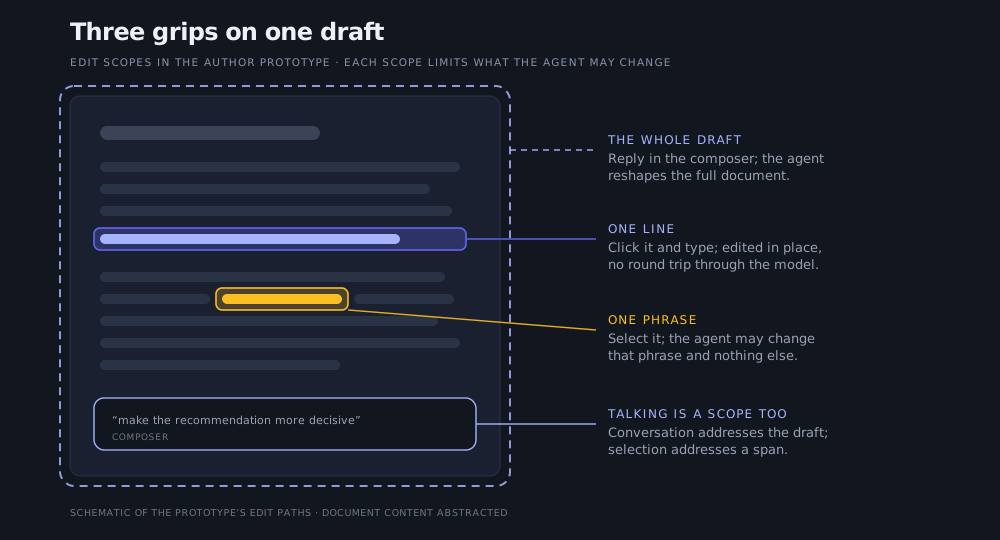
A first draft that lands mostly right is still worthless if fixing the rest is painful, so the design spends most of its care on the editing paths. There are four, offered the moment a draft appears: reply in the composer to reshape the whole thing ("make the recommendation more decisive"), click any line to edit it in place, hover a paragraph to revise that block, or select a phrase and change only the selection.

Schematic of the Author prototype's edit scopes: a document card with a dashed boundary for whole-draft edits via the composer, a highlighted line for click-to-edit, and a highlighted phrase for selection-scoped changes.

Three grips on one draft. Each edit path scopes what the agent may change: the whole draft, one line, or one phrase.

The scopes are the point, and they're why this feels different from a chat tool. An agent that can silently rewrite anything is an agent you can never relax around. Here, the scope you choose is a boundary the agent respects: select one phrase and it may change that phrase and nothing else; click a line and the fix happens in place, with no round trip through the model. Conversation addresses the document; selection addresses a span. You didn't type most of the draft, and it stays yours anyway, because every change after the first one happens on your terms.

Built for our own posts first

We're designing Author for a job we have every week: writing AI Hero's posts and social content in a voice that's recognizably ours, from notes that start as a dictated paragraph. The same design customizes naturally for a customer: their marketing team gets a voice profile mined from their published writing, their document modes, their ban list. A firm whose newsletters should sound like its founder can hold that voice as a durable object instead of hoping each new hire or each new prompt lands close enough.

The design stays small on purpose. There's no formatting toolbar, no template gallery, no attempt to be where documents live forever; a draft ends at a Copy button and a word count. Shaping notes into a sendable draft is the whole job, and everything on the screen either serves it or was left out.

We ran this loop on the post you're reading

One fact worth stating plainly: this article was revised with exactly the workflow Author wraps in a product surface. I supplied the beats as a dictated TL;DR of the point I wanted each section to make. A style guide mined from my older, hand-written Medium posts set the voice rules, including the ban lists. An agent did the shaping, and the edits after that were scoped, the way the paths above describe. The prototype is a design exploration and nothing here ships today, but the split of work it proposes is the one we already write with.

Article by

Rahul Parundekar

Rahul Parundekar

San Francisco-based consultant specializing in cutting-edge Generative AI (GenAI). I partner with organizations to pinpoint high-impact opportunities, streamline AI operations, and accelerate the launch of innovative products—efficiently, cost-effectively, and with controlled risk. Founder of Elevate.do and A.I. Hero, Inc.