Flow — an employee-onboarding process rendered as cross-role swimlanes, with a step detail panel open on 'Provision accounts & hardware'

Flow: making a company's real process the interface

The work that actually runs a company rarely exists as software you can point at. It lives in a head of operations' head, in a checklist someone forked two years ago, and in the tribal knowledge of whoever has done the thing the most times. Flow is a design prototype about capturing that process into software rather than into a document: swimlanes the team recognizes as how the work really runs, a dial on every step for how much a machine is doing, and the exceptions where everyone can see them. This is a non-technical walk through the design decisions.

Updated
July 12, 2026
Reading Time
8 min
Flow — an interactive prototype. Click to open it live.

The process that runs the company has no home

Ask a head of operations to show you how employee onboarding works, and you won't get a screen. You'll get a monologue. Offer accepted, then someone in people ops creates the record, IT provisions the accounts and orders the laptop, the hiring manager preps the team, and somewhere in there the new hire fills out three forms nobody remembers the names of. It mostly works because one or two people carry the whole shape of it in their heads. When they're on vacation, it doesn't.

The usual fix is to write it all down. That helps the auditors, and it fails the team: the documentation goes stale the day it's written, the real process quietly forks away from it, and nobody works in a document anyway. The process is smeared across a spreadsheet, a chat channel, a shared doc, and human memory, so no one can see it whole, no one can trust it's current, and you can't improve or automate a thing you can't see.

We've made the broader version of this argument before: the largest share of how work really gets done has never been captured anywhere an agent, or a new hire, can use. Flow is the follow-through. It's a design prototype that asks what it looks like to capture a process into software, where the team can run it, instead of into a document, where it goes to age.

Capture it where the work runs

The prototype's primary action, top-right, is Capture, and the imagined interaction is deliberately low-ceremony: you don't fill in a form, you talk. "Send a paragraph about onboarding," it prompts. You describe a step in plain speech, something like "on day one people ops verifies the I-9 in person before the new hire can be marked active." An agent drafts the pieces back: a step, the role that owns it, a control, a memory note holding the gotcha. Nothing is saved until a person approves it on the canvas. The first job of the software isn't to design a process; it's to lift the one that already exists out of people's heads.

What the capture produces is the second design decision. The obvious way to build this is a task manager: a list of to-dos with assignees and due dates. The prototype refuses that, because a to-do list flattens a process into an ordered queue and throws away the two things that make a process a process: who owns each part, and what runs in parallel. Instead the screen renders the work as it actually behaves. Left to right, across role-owned swimlanes, grouped into the stages the team already names: trigger, prepare, day one, ramp, complete. The trigger is a real event, Offer accepted, with a note explaining that onboarding starts at signature because the two-week prep window is what makes day one work. Then the flow forks into three branches that run at once: IT provisions accounts and hardware, the hiring manager writes the 30/60/90 plan, people ops assigns a workspace and badge. Nobody waits in line, because in the real work they don't.

Once the capture is faithful, the process becomes the interface. Look at the board and you see the actual org doing its actual work in the shape it really takes. Nobody has to translate a diagram into reality, and when reality changes, changing the board is changing the process.

One owner, many operators, and the new hire gets a lane

The prototype is populated with a stand-in company and sample roles, the way any design mockup is; the names and numbers on screen are placeholders. What's real is the structure underneath. The first piece of it separates an owner from operators. The onboarding process is owned by a single role, stated plainly in the header: eleven steps, owned by the head of operations. That's the person accountable for whether the process is correct, current, and improving. In most companies there is no screen anywhere that shows that person the thing they own.

The operators are the roles who do the steps, modeled as the horizontal swimlanes: people ops, IT, hiring manager, and the new hire, tagged an external party. That last lane carries more weight than it looks. Most workflow tools model only employees, and a real onboarding process hands work to someone who doesn't even have an account yet. Putting the new hire on the board admits that the process crosses the company's boundary, so any honest picture of it has to cross too.

A dial on every step

The legend across the top reads Manual, Assisted, Automated, and every step wears one of the three. This small tag is where agentic AI actually enters the design. For thirty years, business software has been a place to record work that humans do: open a form, type, click save. An agent changes the verb. A step can now be a box an agent completes. So automation stops being a switch you flip over a whole process and becomes a dial you turn one step at a time.

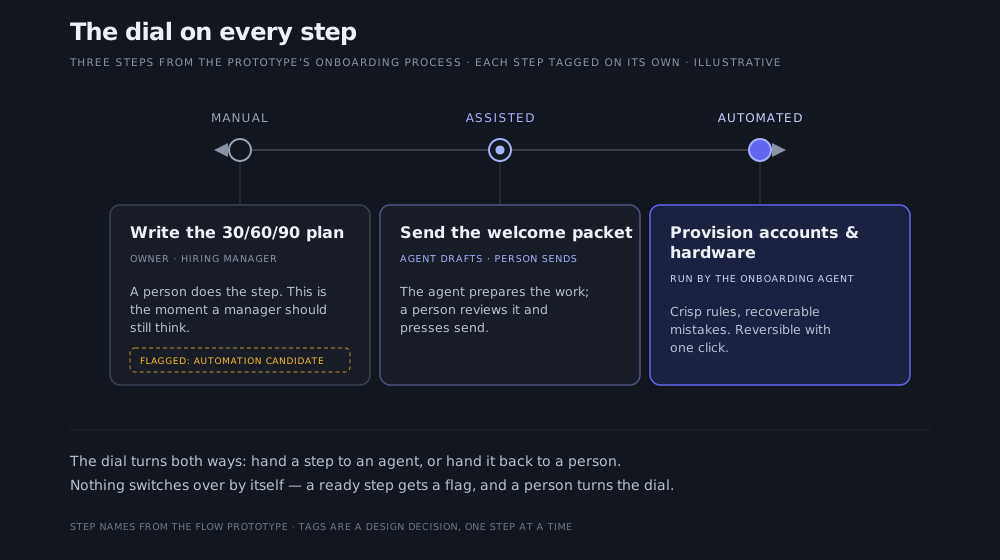
That reframing is what defuses the real adoption fear. Teams don't resist automation because they love manual work; they resist because "automate the process" is an all-or-nothing bet on a thing they can't fully see. Tag each step independently and the conversation changes. In the prototype, "create employee record" and "provision accounts & hardware" run fully automated under an onboarding agent, because their rules are crisp and their mistakes are recoverable. "Send welcome packet" and the 30-day check-in are assisted: the agent drafts, a person reviews and sends. The 30/60/90 plan and the day-one welcome stay manual, because they're moments a human should still own.

Three steps from the prototype's onboarding process at three dial positions: the 30/60/90 plan stays manual, the welcome packet is assisted, and account provisioning is automated. Arrows show the dial turns both ways.

The dial on every step. Three real steps from the prototype, one per position — and a flagged 'automation candidate' waiting on a human decision, not a build.

The dial also turns both ways. Each step carries a small toggle: hand a step to an agent, or hand it back to a person. A manual step the system thinks is ready wears a quiet "automation candidate" marker rather than being switched over for you; the 30/60/90 plan wears exactly that marker in the shot. There's a coach, too. The header carries an AI insights affordance showing +26% (a sample figure in the demo, like every number on these screens). Open it and the suggestions are specific: send day-one paperwork before day one, auto-draft the ramp plan, trigger provisioning off the applicant system. Suggestions, and only that. The human turns the dial.

The exceptions are the process

Select a step and a detail panel opens. In the shot it's Provision accounts & hardware, tagged Automated · Onboarding Agent and marked a Sub-process: this one step is itself a whole flow, "device & access provisioning," owned by IT, where accounts get scoped to the position's access group under a least-privilege check and the kit ships three business days before the start date. Nesting a process inside a step keeps the top-level board readable while holding the full depth underneath. The panel opens on a plain-language "how the work is done" list, and a memory tab holds the reasoning behind the step.

The part that earns the design its keep sits below that: Exceptions & escalations, in the step itself, not in a runbook. Three "IF" rules are spelled out in the open:

  • Background check fails after provisioning — revoke all accounts immediately, don't wait for HR. Routed to the IT administrator.
  • Hardware backordered more than five days — notify the manager and the hire, provision the accounts anyway, ship the kit later.
  • Hire is a contractor, not an employee — hold SSO until the background check clears; the agent parks the account in "requested" and a person releases it by hand.

Each of those is a piece of institutional judgment that normally lives nowhere. The "don't wait for HR" clause is a lesson someone learned the expensive way. The contractor rule is the edge case that quietly breaks onboarding at companies that haven't written it down. And this is the condition for trusting an agent with a step at all: the step has to say, out loud, what to do when reality bites and who gets the escalation.

The hard parts: ownership, and the calls left to a human

The most delicate design problem was the hand-off. Work crosses from people ops to IT to the hiring manager and out to the new hire, and each crossing is a place where things get dropped. Swimlanes make the hand-off literal, but the design still has to decide who owns a step versus who merely touches it. The answer here is that ownership is explicit and singular: one owner for the process, each step in exactly one lane, each exception naming exactly one role to escalate to. A lane also carries standing directives of what its role must, should, may, and must not do. IT, for one, must scope every account to the position's access group and must not release SSO before a contractor's check clears. Ambiguous ownership is how processes rot, and how agents cause damage, so the design refuses to allow it.

What the design deliberately holds back

The software is also held back from getting ahead of its user's trust, on purpose. Nothing captured is saved until a person approves it. Every automated step is reversible with one click. And where a step needs real judgment, an agent recommends without deciding: after the 30-day check-in, a "next best action" step reads the ramp signals and proposes one of three routes: close onboarding, open a growth plan, or schedule coaching. A person confirms before any route is taken. Keeping the human in charge of an agentic tool is a design decision, and it has to be made on purpose, step by step.

Why this shape of software

A fair objection: swimlanes and status tags are commodity, and a dozen workflow tools draw them. They do. What a generic tool can't carry is the "contractor, hold SSO until the background check clears" rule, because that rule belongs to one company and no other. The value isn't swimlanes in the abstract; it's that they hold this company's eleven steps, these four roles, that specific escalation. Invoice approval, customer onboarding, and incident response sit beside it, each with its own hard-won exceptions. Fidelity like that only happens when the software is shaped to one organization's real process, which is the case we make in full in the bespoke SaaS post.

There's a payoff waiting one step further on, too: once a step is captured this faithfully, owner and rules and exceptions included, it becomes the kind of work an agent can take on with confidence. For the record: Flow came out of the same run of sprints as our other prototypes; there's no shipped product or customer behind it. What's meant to be real is the argument the screens make.

If your own critical processes live in someone's head today, the useful question is the capture one: what would it take to get yours onto a screen your team recognizes as true?

Article by

Rahul Parundekar

Rahul Parundekar

San Francisco-based consultant specializing in cutting-edge Generative AI (GenAI). I partner with organizations to pinpoint high-impact opportunities, streamline AI operations, and accelerate the launch of innovative products—efficiently, cost-effectively, and with controlled risk. Founder of Elevate.do and A.I. Hero, Inc.